How to Register for Pubnet
Step 1: Understand Our Pricing
Pubnet has no ongoing monthly fees for retailers but you may have one-time charges of up to $150 maximum. We charge a $75 setup fee that we will invoice you for after your registration is approved. If you do not already have one, you will also need a SAN, which we can provide for you for $75 (50% off Bowker's list price).
If you are an ABA member whom we approve for registration, your cost will be $0 as we will waive the setup fee and provide you with a free SAN if needed. Make sure you are listed in the ABA member directory.
If you are a provisional ABA member or otherwise not listed at the directory, please email us your ABA member number prior to or after submitting your registration so she can vet your membership with the ABA.
Step 2: Confirm Required Software
Pubnet uses EDI technology, which stands for Electronic Data Interchange. This means that the documents sent over our service are not human readable and you need EDI-capable software to create your purchase orders and display the suppliers' confirmations. In order to be approved to use Pubnet, you must have a book inventory system on this list or do a custom development.
If you do not have software on our list of confirmed integrations, please register for Pubeasy instead.
Note:
- If you are beta testing for a new POS partner, please email us instead of using the registration form.
- If you are a developer that wants to integrate with Pubnet, please review this page and then contact our Support team before registering.
Step 3: Verify Registration Email Address
- Go to our registration page.
- Enter your email address.
- Find and respond to the verification email within 1 hour. (If you miss this time window, start over at Step 2.)
Step 4: Choose Service
Existing MVB users
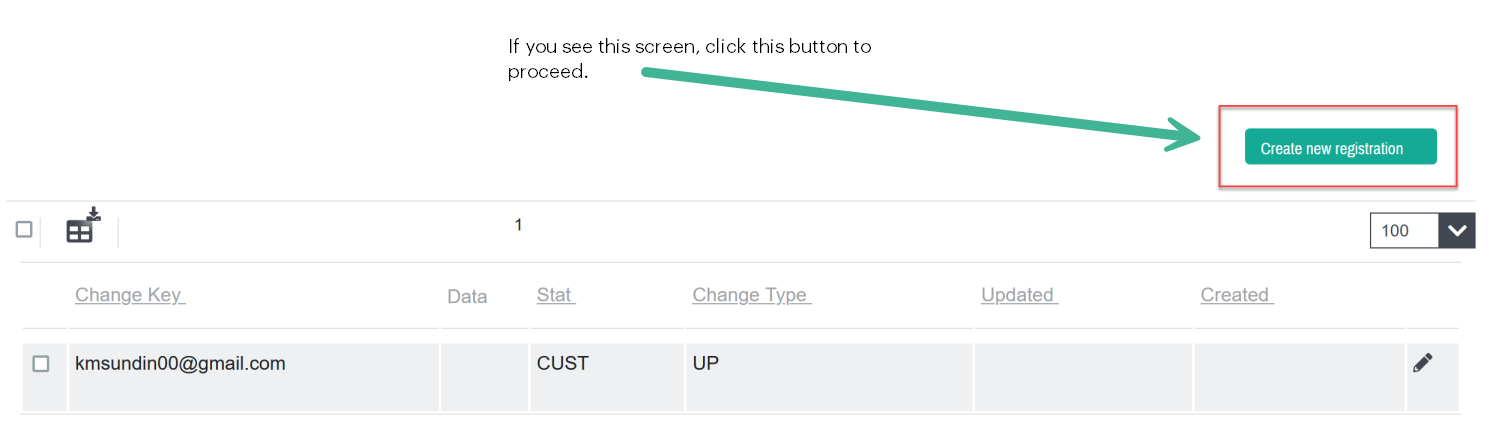
If you are already registered for our Pubeasy service under the email you entered in Step 2, you will be shown this screen and will need to click the Create new registration button to get to the product selection screen.
New users
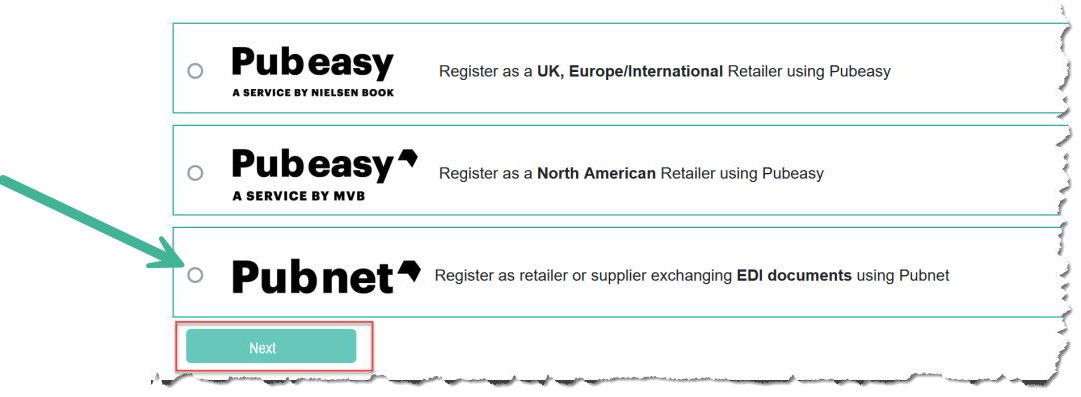
You will be brought directly to the product selection screen:
Step 5: Submit Application Form
You will be asked for several pieces of information. Here are some common questions about our form:
- For Company Name, please enter either your Ship-To store name alone or both your LLC and dba names. We are primarily interested in the name that you receive deliveries under.
- Store number is optional and primarily for chains.
- If you don't know your SAN, don't worry about finding it. We can look up whether you have an existing one or not and provide one if needed.
- For community, if you are not a college or christian store, choose Trade. This is the industry term for general books carried by indie bookstores.
- Connection type: If you do not see your software on this list, please email us before proceeding or your registration may be rejected.
Step 6: Receive Welcome Letter
We manually vet and approve Pubnet registrations so it will take 1-2 business days before you receive your welcome email with your Pubnet FTP credentials. It will come from Support@mvb-online.com. If you haven't received it within this time period please check your Spam/Junk filters.
Please save this email (or the information within it) as you will need it to configure your inventory management system.