Transitioning to SFTP
Overview
For improved security, Pubnet will be sunsetting FTP and transitioning all users to SFTP.
This transition will involve making these changes:
- URLs: sftp-edi.pubnet.org (production), sandbox-sftp-edi.pubnet.org (sandbox testing)
- Port: 22
- Single-level login, no need for proxy
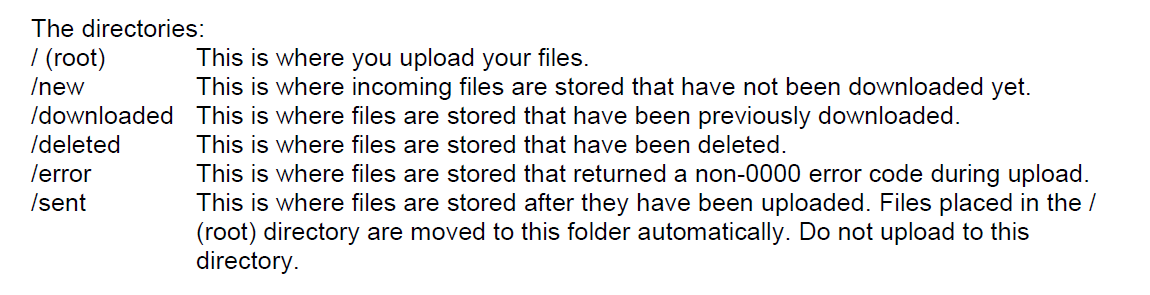
- Modifications to the folder structure
As we know this will involve coding changes for partner applications, we have not yet announced a firm deadline for the transition as we would like your input on a reasonable timeline. Please email supportUS@mvb-online.com to confirm that you are scheduling any necessary development and when you would like to begin testing with us.
We will update this page on an ongoing basis as we have further information to share or as questions arise.
Folder Structure
When transitioning from FTP to SFTP, please note these changes:
- The user will see the folder structure when connecting via SFTP.
- The 'deleted' folder has been renamed 'archived', but functions identically otherwise.
Structure:
URLs
If you are using an SFTP connection but pointing to the old FTP URLs, this currently works since the URLs point at the same IP address. However, we recommend updating them to the new ones as we are unlikely to maintain the old URLs after we sunset FTP.
Testing
We recommend testing your SFTP integration on our Sandbox system before placing it live on production. Please make sure to test both sending and retrieving files. If you email supportUS@mvb-online.com after sending your PO to our test vendors SAN 9926291 (for 3060) or SAN S9926313 (for 4010), we can generate a POA for you to download.